Logo for Brainrots Tools Hub
Checklists and wiki helpers for quiz drills — not a fake in-browser app.
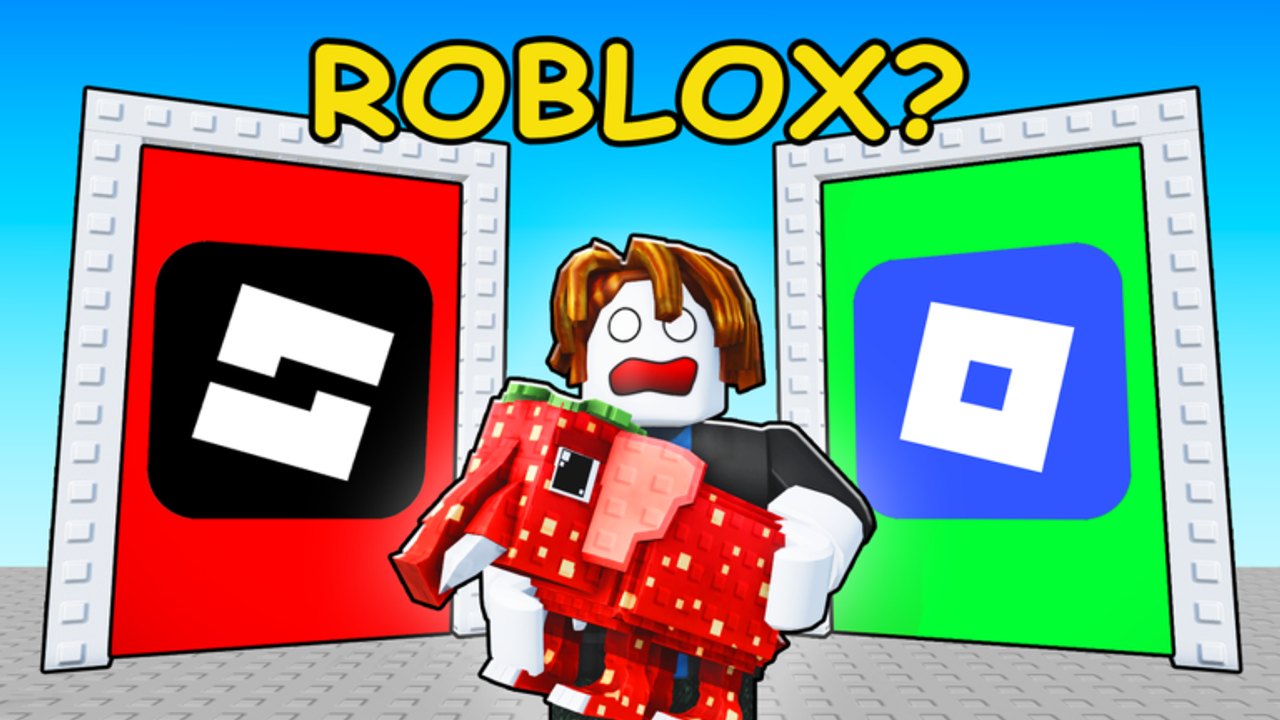
This hub is the practical toolkit for Logo for Brainrots. It is not an interactive simulator and it does not auto-click doors. The useful tool is a method you can run with a still image, a short, or a live six-player server: cover the prompt, pick a side, check, and log the miss. The dedicated drill lives on logo practice. Around that drill, use this wiki the same way you would use a paper checklist: codes for promo rewards when FootballVerse ships them, and the tier list for which quiz types deserve the drill in the first place.
Logo for Brainrots is a Roblox quiz-tycoon from FootballVerse, live since 4 May 2026, with six-player servers. Official copy is guess the correct logos, raise Brainrot Score, unlock Brainrot Multipliers. Tools here exist to make that loop honest. They do not invent a 500-unit calculator, and they do not scrape dollar-per-second rows from a different Brainrot game.
What a tool is on this wiki
A tool is a repeatable method with a written output. For Logo for Brainrots that output is a miss log (color, glyph, stroke, flip) and a session plan (which pair type to drill, when to open the multiplier panel). If a page cannot produce one of those, it is an article, not a tool, and it belongs under guides or the roster.
The one tool we actually ship as a child page is logo practice. Everything else on this hub is how to aim that tool at the rest of the site.
Logo practice, in one paragraph
You need a pair of marks. Official thumbs are enough: Roblox blue diamond versus black stacked-brick fake, LEGO red plate versus blue plate. Cover the prompt with a hand or a sticky note. Pick left or right in two seconds. Uncover. Write one miss word if you were wrong. Repeat until that pair is boring. Then take the method into a live server. Full steps, including how to log extra strokes, live on logo practice.
Do not wait for a custom web app that randomizes Italian brainrot faces. That would be a different product, and it would go stale the first time FootballVerse changes a door. A checklist survives a patch. An unofficial quiz app usually does not.
How to use the rest of the wiki as a toolkit
Open pages in a fixed order so you do not wander:
- Codes — claim anything that is actually live. A code that grants a boost is only useful if you redeem it before the drill, not after you already misclicked for twenty minutes.
- Tier list — pick one weakness. If your misses are near-identical marks, you are drilling S-tier difficulty, not farming. If your accuracy is fine and the panel is idle, you do not need this hub yet; you need score.
- Logo practice — run the drill on that one weakness for a short block.
- Live server — six players, same doors, same three checks. Stop when the miss log stops shrinking.
That is the toolkit. Brand pages, mascot pages, and patch pages support it. They are not extra apps.
What this hub will not pretend to be
We will not embed a fake “guess the logo” widget that shuffles unmarked images and claims to be the live game. We will not generate random Brainrot names from other titles and call that a practice exam. We will not ship a multiplier calculator with invented x values. Check the in-game multiplier panel for numbers. Check official thumbs for pairs. Check this wiki for the method that connects the two.
If you want a video of the guess-the-correct-logo format, the practice page carries one real clip. This hub stays text so you can skim it between queues.
A five-minute pre-queue checklist
- Redeem live codes if the codes page shows any.
- Note your last miss word (color, glyph, stroke, or flip).
- Open the matching rank on the tier list so you know whether tonight is a drill night or a score night.
- Run three covered-prompt reps on logo practice.
- Queue a six-player server. Stand on the grey path. Do not block the frame.
If you skip the three covered-prompt reps, you will use the live server as your first drill, and six other people’s time becomes your warm-up. That is a bad tool. Warm up on stills, then farm on doors.
When to put the tools down
Stop drilling when the pair is boring and your live miss rate on that type has dropped. More reps after that is stalling. Switch to score. Stop using the wiki as a toolkit when you start reading it instead of clicking doors — the checklist is supposed to shrink your time-to-first-correct, not replace the tycoon. Come back when a new official thumb adds a pair you have never covered, or when a code drop actually exists.
FootballVerse can add doors without adding a practice mode. That is why this hub is a method, not an app. Keep logo practice as the only child you need, keep codes and the tier list as the two aiming pages, and ignore anything that promises a fake interactive Logo for Brainrots exam. The real exam is the brick frame in front of you.
Frequently Asked Questions
Quick answers to the most common questions.
Is there an interactive logo quiz on this wiki?
No. The tool is a checklist. Run it on logo practice with official thumbs or a live server, not a fake in-browser app.
What should I open before I drill?
Can I practice Italian brainrot faces here?
Use the same cover-and-pick method on any pair you have an image for. Do not expect a generated 500-face exam. Rank the pair you can actually see.
Do these tools give multiplier numbers?
No. Check the in-game multiplier panel. This hub helps you miss fewer doors so the panel can actually unlock.