Logo for Brainrots Controls
Roblox movement and camera, then tap or click the matching logo door or card.
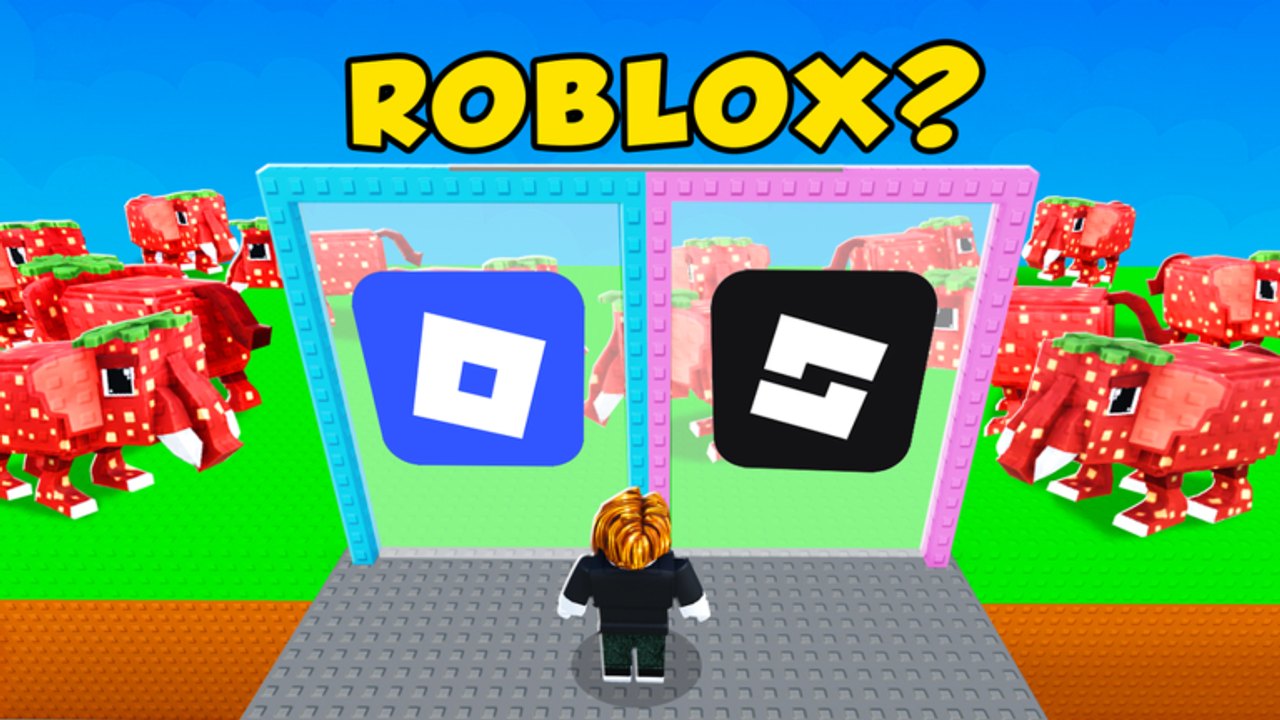
Logo for Brainrots uses ordinary Roblox input plus one extra action: choose a logo. You move, you look, you tap or click the matching door or card. That is the whole confirmed scheme. FootballVerse (SimplRep) did not publish a custom keybind poster for this wiki to copy, and we will not invent one. If a prompt on your client disagrees with a sentence here, the in-game settings menu is the source of truth. This page explains what you must be able to do, how that maps to PC, mobile, and console, and how input mistakes look like quiz mistakes.
The game is still a quiz-tycoon. Controls do not steal, lock a base, or grab a conveyor unit. They get your avatar to a two-door or two-card prompt so you can raise Brainrot Score. Read How to Play for the loop and Getting Started if you have not joined a six-player server yet.
What you need to do every round
Three jobs repeat:
- Move to a place where both logo options are visible.
- Aim the camera so the prompt and both marks are on screen.
- Choose the matching door or card with a tap, a click, or by walking into it.
If you cannot do those three things on your device, you cannot play the quiz. Everything else is Roblox chrome: jump if your client jumps, emote if you must, open menus between prompts. None of that is a secret interact key for scoring.
PC
On keyboard and mouse, movement is WASD. The camera is the standard Roblox mouse look. Sprint, jump, and shift-lock use whatever you already configured in Roblox settings. To answer a prompt, walk into the correct door or click the correct card. Do not assume E, F, or a custom “guess” key unless the settings menu on your client lists one. If click-to-move is enabled in Roblox, it can send you through the fake door; turn it off if you keep sliding into the lookalike.
Keep the mouse free during the prompt. A camera yank at the moment you click is a common miss on two-card layouts. Center the pair, read ROBLOX? or LEGO?, then one click. After the round resolves you can look around for a mascot payout.
Mobile
On touch, the left on-screen stick (or the left side of the screen, depending on your Roblox touch layout) moves the avatar. Drag on the right side to move the camera. Choose a logo by tapping the door or the card. That tap is the guess. A joystick slide into a doorway can also count as a choice if the door triggers on overlap, so lift your thumb before you commit.
Fat-finger misses are the mobile scoring problem. Zoom the camera so the two options are large. Tap the mark, not the mascot beside it. A strawberry elephant or a house-headed character in the frame is decoration unless the prompt named that mascot. If your thumbs cover the prompt, use a higher camera angle from the Roblox touch camera controls, then tap.
Console
On a gamepad, the left stick moves and the right stick looks, matching default Roblox. Triggers, bumpers, and face buttons stay on whatever Roblox already bound for jump, emote, and menu. To guess, walk into the door or use the same confirm Roblox uses to activate a world object if your client requires one. We will not list a face-button letter that FootballVerse has not confirmed. Open the in-game settings menu and the Roblox experience controls pane if stick-to-door overlap is not registering.
Dead zones matter. A drifting right stick can swing the camera onto the fake card right as you commit. Recalibrate in device settings if every guess feels pulled to one side. Six-player lobbies get messy on console when four avatars occupy the same doorway; strafe with the left stick until you can see the glyph, then walk in.
Camera, menus, and settings
The camera is part of the quiz. If you cannot read the inner diamond of the Roblox mark or the LEGO word, you are guessing. Raise or lower the camera with the usual Roblox control for your device. First-person versus third-person is a comfort choice; third-person makes two-door frames easier to compare because both marks stay in view.
Open the settings menu between prompts, not during them. Check:
- Movement and camera sensitivity.
- Shift-lock or camera mode on PC.
- Touch jump button visibility on mobile.
- Any experience-specific toggle the client actually shows.
If a friend swears there is a dedicated “pick logo” key and your settings list does not show it, your friend is remembering another game. Stick to move, look, and choose.
Input mistakes that dump Brainrot Score
Most “I cannot score” reports are control issues wearing a quiz costume:
- Walking into the fake because camera lag hid the real mark.
- Tapping a mascot instead of the card.
- Holding WASD through a resolved round and sliding into the next fake.
- Using click-to-move on PC and pathing through the wrong door.
- Griefing the doorway so nobody, including you, can see the glyph.
Fix the input, then go back to recognition on How to Guess Logos. Score habits live on How to Increase Score. Multiplier targets live on multipliers. This page will not grow a keybind table to fill space.
Device checklist before you blame the quiz
- Confirm WASD or the left stick moves you in the lobby.
- Confirm the camera looks at both logo options.
- Confirm a tap, click, or walk-in selects a door or card.
- Open settings and match what the client lists, not what a screenshot from another brainrot game lists.
- Play one clean prompt on purpose: read, choose once, stop moving.
When that checklist passes, you have controls. Everything after that is the quiz. The Guides Hub points at the rest of the how-tos. Brand-new players should still run the first-hour list on Getting Started so like-and-group and the first mascot payout are not mixed up with a sensitivity problem.
Frequently Asked Questions
Quick answers to the most common questions.
What are the confirmed controls?
WASD or the left stick to move, the usual Roblox camera to look, and tap, click, or walk-in to choose a logo door or card. Check in-game settings for anything else.
Is there a special key to guess the logo?
None is confirmed. Do not memorize E, F, or a made-up guess bind. If your client lists an extra control, that settings menu wins.
Can I play on phone and console?
Yes. Logo for Brainrots runs through Roblox on PC, mobile, and console. Movement, camera, and choose-a-logo are the same jobs on every device.
Why do I keep walking into the fake door?
Camera lag, click-to-move, or a held joystick. Stop moving, frame both marks, then commit once. See How to Play for the round flow.
Do controls include stealing or base locks?
No. This game is a logo quiz plus Brainrot Score and multipliers. Input does not include conveyor or steal-base actions.
Where should I go after this page?
Return to Getting Started if you are new, or How to Increase Score if input is fine and the meter is not moving.